Table Attachment Troubleshooting | CarInteriorMix
Cabin-friendly table attachments?lap desks, steering wheel trays, seat-back tables, and console-mounted work surfaces?have become a go-to upgrade for drivers who road-trip, commute long distances, camp out of their SUV, or simply want a stable spot for snacks and devices. When they work, they?re brilliant: your coffee stays upright, your tablet sits at the right angle, and the interior feels more functional without permanent modifications.
When they don?t work, they can be downright annoying (wobble, slipping, rattles) or even unsafe (blocking airbags, interfering with controls, turning into a projectile during hard braking). A ?table attachment troubleshooting? mindset saves money, protects your interior, and keeps your setup secure?especially if you?re using it in a family vehicle, on long drives, or in a work truck.
This guide walks you through diagnosing common issues, fixing them step-by-step, and choosing the right type of car table attachment for your vehicle and use case. You?ll also find real-world examples, common mistakes to avoid, and a quick FAQ at the end.
What Counts as a Car Table Attachment?
Car table attachments come in a few main styles, and troubleshooting often depends on which style you?re using:
- Steering wheel tray/table: Hooks onto the steering wheel rim (often used while parked).
- Seat-back tray: Mounts to headrest posts or straps around the seat back for rear passengers.
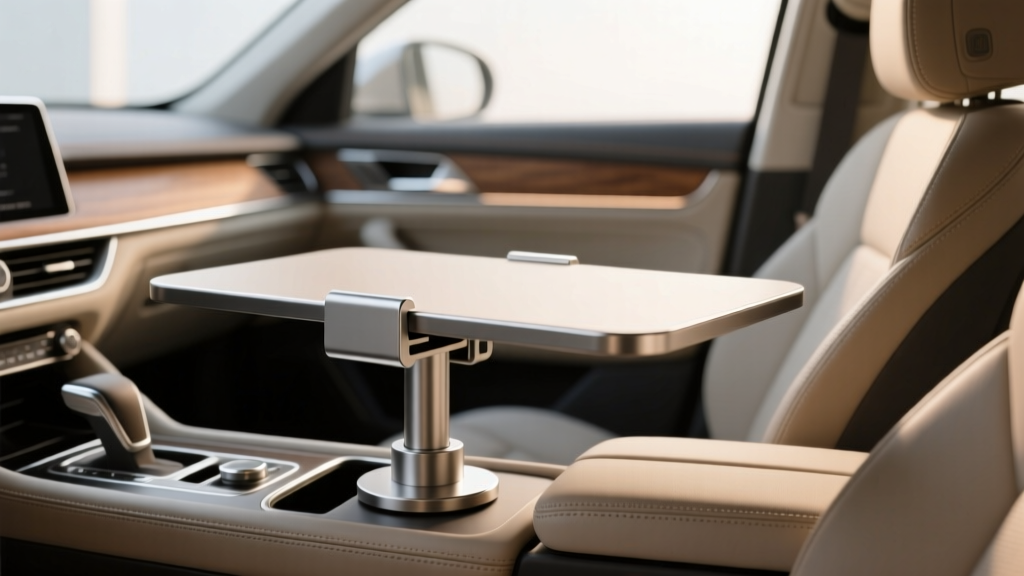
- Center console/armrest table: Clamps or rests over the console/armrest area.
- Lap desk or portable table: Sits on your lap or the seat cushion; may have anti-slip backing.
- Universal clamp tables: Clamp to rails, seat frames, cargo-area tie-down points, or other interior hardpoints.
Safety baseline: Most tray tables are intended for parked use. If a product isn?t explicitly rated for use while driving, assume it?s not. Even in the rear seats, a loose or overloaded table can become hazardous.
Quick Diagnostic Checklist (Before You Start Adjusting)
Run this fast check to narrow down the problem in under five minutes:
- Confirm compatibility: Headrest posts (removable vs fixed), steering wheel thickness, seat-back shape, and console width vary by model/year.
- Identify the attachment points: Are you clamping plastic trim, leather upholstery, or a solid metal post? Stability depends on this.
- Check load and leverage: A 2 lb laptop positioned far from the clamp can create more torque than you expect.
- Inspect surfaces: Dust, interior dressing, leather conditioner, or sunscreen residue can make clamps slip.
- Look for missing parts: Rubber pads, set screws, straps, or anti-rattle shims are often the ?small piece? that makes everything work.
Most Common Problems (and What Usually Causes Them)
1) The Table Wobbles or Shakes
- Typical causes: Clamp not tight enough, soft mounting surface, too much cantilever (weight far from mount), loose hinge hardware, or incompatible seat/headrest geometry.
- Real-world example: A headrest-mounted tray that feels solid on a sedan may wobble on a 3-row SUV because the second-row seat back is thinner and more flexible.
2) The Table Slips or Slides Out of Position
- Typical causes: Smooth leather, interior protectant on plastic, worn rubber pads, clamp jaws too shallow, or steering wheel cover changing thickness.
3) It Won?t Fit (or Barely Fits)
- Typical causes: Fixed (non-removable) headrests, thick steering wheel rims, sporty seats with integrated headrests, wide center consoles, or unusual seat-back contours.
4) Rattles, Squeaks, or Interior Buzz
- Typical causes: Hard plastic-to-plastic contact, loose hinge screws, vibration from road texture, or the table touching trim pieces intermittently.
5) It Leaves Marks on Leather/Plastic
- Typical causes: Over-tightening, abrasive clamp pads, grit trapped between pads and surface, heat softening trim, or dye transfer on light upholstery.
6) It Interferes with Airbags, Seats, or Controls
- Typical causes: Poor placement near steering wheel airbag zones, seat-back tray blocking rear seatbelt operation, or console-mounted tables impeding shifter access.
Step-by-Step Troubleshooting: Secure the Mount First
Use this process any time your car table attachment feels unstable. The goal is to build a solid base before worrying about angles and accessories.
Step 1: Remove, Clean, and Reset
- Take the table off completely.
- Clean the contact points (table pads and vehicle surface) using a lightly damp microfiber towel. If the area is oily, use a mild interior cleaner safe for your trim (avoid harsh solvents).
- Dry thoroughly. Slippage often comes from residue, not weak clamping force.
Tip: If your interior has a slick protectant, buff the mounting area with a clean microfiber until it feels less slippery. Avoid permanently ?de-glossing? delicate trim?just remove residue.
Step 2: Inspect Hardware and Pads
- Check for stripped threads on knobs or set screws.
- Confirm rubber pads are present and aligned (missing pads create wobble and marks).
- Tighten hinge screws with the correct tool (often a Phillips or hex key).
Quick fix: If a hinge keeps loosening, apply a small amount of medium-strength threadlocker to the screw threads (avoid high-strength types that make future adjustments difficult).
Step 3: Mount to the Strongest Point Available
- Headrest-post tables: Clamp to the metal posts, not the upholstery.
- Console tables: Prefer clamping to a rigid console edge rather than a padded lid.
- Clamp-style tables: Seek metal rails or sturdy structural points, not thin plastic trim.
Real-world example: If your console lid is soft, a clamp table may feel ?tight? but still moves because the padding compresses. Moving the clamp to a harder console edge typically solves it.
Step 4: Reduce Leverage (Move Weight Closer)
Leverage is the enemy of stability. Keep heavy items close to the mount:
- Place laptops/tablets nearer the clamp and use a smaller mouse pad area.
- Avoid hanging bags from the table edge.
- Don?t rest your forearms heavily on a steering wheel tray?it?s meant for light tasks while parked.
Step 5: Add Controlled Friction (Without Damaging Surfaces)
If the table still slips:
- Add a thin rubber shim or silicone pad between clamp and surface.
- Use felt tape where plastic contacts plastic to stop squeaks.
- For lap desks, add a non-slip mat (the type used for dashboards) under the desk.
Tip: Avoid thick foam that compresses and rebounds?this can increase wobble.
Fitment Troubleshooting by Table Type
Steering Wheel Tray Troubleshooting
These are convenient but have strict fit and safety limits.
- If it won?t hook securely: Remove bulky steering wheel covers; confirm the tray is designed for your wheel thickness.
- If it sits crooked: Rotate the steering wheel so the rim is level (only when parked). Some wheels have flat-bottom shapes that don?t play well with universal trays.
- If it interferes with controls: Don?t force it. If it contacts stalks/buttons, it?s not a good match for your vehicle.
Safety reminder: Never drive with a steering wheel tray installed. It can restrict steering movement and sits in the airbag deployment zone.
Headrest/Seat-Back Tray Troubleshooting
- If your headrest is fixed: Many headrest-post mounts won?t work. Look for strap-based seat-back organizers with integrated trays instead.
- If the tray tilts downward: Tighten angle locks and ensure the posts are evenly clamped. Uneven post spacing can cause a twist.
- If the seat back flexes: Use a tray with a wider support frame or secondary straps that anchor lower on the seat back.
Kid-friendly tip: Choose trays with raised edges and cup recesses. Small design touches reduce spills and keep crayons/snacks from rolling off during stops.
Center Console / Armrest Table Troubleshooting
- If it blocks the shifter or HVAC controls: Reposition rearward or choose a slimmer model designed for your console layout.
- If the armrest lid won?t close: Consider a removable design or a table that mounts to seat rails instead of the console.
- If it scuffs piano black trim: Add clear paint protection film (PPF) to the contact area or use felt-backed pads.
Product Recommendations: What to Look For (and Which Type to Choose)
Rather than chasing a specific brand that may change year-to-year, shop by design features. These are the specs that matter for stability and interior protection.
Best for Quick Parked Work: Steering Wheel Tray
- Look for: Deep hook profile, non-slip rubberized contact points, and a reinforced (not flimsy) tabletop.
- Ideal use: Parked lunch breaks, checking emails, light typing.
- Avoid if: You have a thick wheel cover, flat-bottom wheel, or sensitive trim you don?t want touched.
Best for Rear Passengers: Headrest-Post Tray or Strap-Based Tray
- Look for: Metal post clamps, dual-post support, adjustable tilt, and a weight rating that matches your use.
- Ideal use: Kids? snacks, tablets, travel games.
- Pro tip: If you frequently fold seats, choose a quick-release style so you?re not fighting hardware every time.
Best for Road-Trip Utility: Console Table or Seat-Rail Clamp Table
- Look for: Wide clamp jaws, replaceable pads, a locking hinge, and minimal interference with seat travel.
- Ideal use: Camping setups, mobile office tasks while parked, organization between front seats.
- Best interior-friendly feature: Oversized rubber pads with a slightly soft durometer to grip without biting into trim.
Feature Comparison: What Matters Most
- Stability: Dual-post mounts and seat-rail clamps typically beat single-point console mounts.
- Interior protection: Replaceable pads and rounded edges reduce marks.
- Adjustability: A strong angle lock prevents droop under load.
- Noise control: Built-in anti-rattle shims or tight tolerances prevent buzzing.
Common Mistakes to Avoid
- Mounting over airbags or in deployment paths: Steering wheel center, A-pillar zones, and some seat-mounted airbags must stay clear.
- Over-tightening clamps: This can crack plastic trim, dent soft-touch panels, or permanently crease leather.
- Ignoring seat movement: A tray that fits with the seat upright may bind when you recline or slide the seat.
- Using it while driving (front seat): Even ?stable? setups can become dangerous in a sudden stop.
- Skipping surface prep: Most slipping problems come from slick residues, not weak clamps.
- Overloading: A table designed for a sandwich and a phone may not handle a heavy laptop plus leaning body weight.
Practical Tips for a More Stable, Quieter Setup
- Use a dedicated storage spot: Keep the attachment in a door pocket or behind the seat so it doesn?t rattle in the trunk.
- Add a tether for rear-seat use: A simple strap looped to a headrest post can prevent the table from falling during rough roads.
- Mind temperature swings: Plastics expand in heat; re-check clamp tightness seasonally.
- Protect light interiors: On beige or light gray leather, place a clean microfiber barrier under clamp pads to reduce dye transfer and scuffs.
- Test before a trip: Load it with what you?ll actually use (tablet, snack, water bottle) and drive around the block to listen for rattles?then fix them before a long haul.
FAQ: Table Attachment Troubleshooting
Can I use a steering wheel tray while driving?
No. Steering wheel trays are intended for parked use. They can restrict steering input and sit in the airbag deployment area, creating a serious hazard.
My headrest-mounted tray doesn?t fit?what are my alternatives?
If your headrest is fixed or integrated, look for a strap-based seat-back tray or an organizer with a fold-down table that doesn?t require removing the headrest.
How do I stop my table from scratching piano black trim?
Use felt tape or soft pads on the table?s contact points, and consider applying a small piece of clear PPF to the trim where the clamp touches. Clean grit off pads regularly?dust is often what causes micro-scratches.
Why does my clamp feel tight but the table still moves?
You?re likely clamping onto a surface that compresses (padded armrest, soft-touch panel, thick upholstery). Move the clamp to a more rigid edge or structural point, and reduce leverage by keeping heavy items closer to the mount.
What?s a reasonable weight limit for most car table attachments?
It varies by design, but many light-duty trays are best kept under a few pounds?think food, a tablet, or a small laptop. If you need a heavier-duty setup (laptop plus typing pressure), look for reinforced hinges, dual support points, and published load ratings.
How can I eliminate rattles from a seat-back tray on rough roads?
Tighten all hinge screws, add felt tape where plastic parts meet, and ensure straps are tensioned evenly. If the seat back itself flexes, choose a tray with a wider frame or secondary stabilizing straps.
Wrap-Up: Your Next Steps
Start by identifying your table type, cleaning the contact points, and verifying you?re mounting to a rigid structure. Most wobble and slipping problems are solved by better surface prep, corrected clamp placement, and reducing leverage. If the table still fights you, it?s usually a fitment mismatch?switching to a headrest-post design, strap-based tray, or seat-rail clamp table can be the cleanest solution.
Want more interior upgrades that make your cabin more useful (without damaging it)? Explore more guides and hands-on tips at carinteriormix.com.