LED Strip Color Matching: Car Interior Guide (2026)
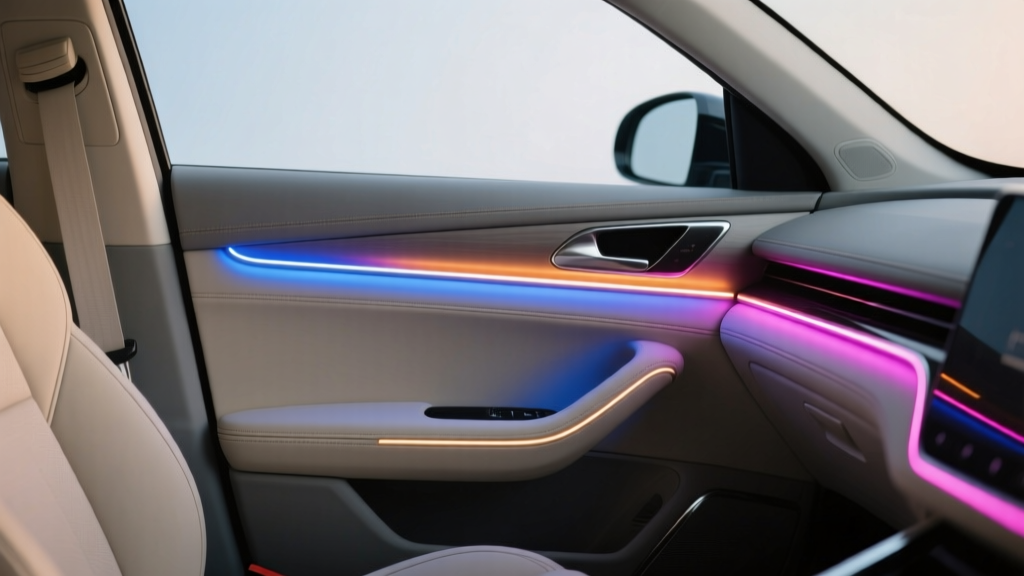
Getting LED strips installed in your car is only half the job. The part that separates a ?cool mod? from a factory-clean interior upgrade is color matching?making the lighting look intentional, consistent, and easy on the eyes. If you?ve ever installed a set of ambient LEDs and noticed one door looks ?bluer? than the dash, or the footwell looks brighter than the console, you?ve seen how small color shifts can make the whole setup feel off.
This guide focuses on the real-world side of color matching after you?ve picked your LED strips: how to make different zones look uniform, how to choose the right color temperature, how to deal with mixed materials (leather, plastic, fabric), and how to tune brightness so the cabin feels premium instead of distracting. We?ll also cover common mistakes that cause mismatched colors and provide practical steps to fix them.
If Part 1 helped you choose the right LED strip type and plan the wiring, Part 2 is your playbook for making the finished install look cohesive?whether you?re going for a subtle OEM ambient vibe or a bold show build.
Why Color Matching in Car Interiors Is Trickier Than It Looks
Color matching inside a car is harder than matching LEDs on a desk or in a room because the cabin is a mix of textures, angles, and reflective surfaces. Light behaves differently on every material and panel shape.
- Different surfaces shift perceived color: Black plastics absorb light, light-colored leather reflects it, and metallic trim can create hot spots.
- Viewing angles matter: LED strips are directional. A strip aimed into an open footwell looks different than the same strip tucked behind a dash lip.
- Multiple light sources can clash: Factory white buttons, infotainment backlighting, gauge cluster colors, and aftermarket LEDs can create a ?mixed palette.?
- Not all ?RGB? is equal: Two different controllers can output slightly different red/green/blue intensities?even when set to the same color code.
Start With a Color Strategy (OEM, Accent, or Statement)
1) OEM-Plus Ambient (Most Popular)
This approach aims for a factory feel: low brightness, consistent color, and no harsh glare. Common choices include:
- Soft white: 4000K?5000K for clean visibility without looking icy
- Warm white: 2700K?3500K if your interior has tan, brown, or wood accents
- Single color accents: subtle blue, amber, or red to match gauge lighting
2) Accent Lighting (Sporty, Custom)
Here you highlight zones like footwells and door pockets while keeping the dash more subdued. You can mix two related hues (example: deep blue + cyan) but they must be tuned carefully to avoid looking mismatched.
3) Statement/Show Mode (Bold RGB Effects)
Chasing effects, color cycling, music sync?these can look awesome, but color consistency becomes even more important because animations exaggerate differences between zones.
Color Temperature vs RGB: Know What You?re Matching
White LEDs (Color Temperature Measured in Kelvin)
If you?re using white-only LED strips, color matching is mostly about choosing the right Kelvin rating and keeping it consistent across the cabin.
- 2700K?3000K: warm, cozy, classic luxury vibe
- 3500K?4500K: neutral white; excellent for most interiors
- 5000K?6500K: cool white; modern but can feel harsh if too bright
RGB/RGBW LEDs (Color Mixed by Controller)
With RGB strips, ?white? is often a mix of red+green+blue. That can look slightly tinted (pinkish, bluish, or greenish). RGBW strips add a dedicated white diode for cleaner white output, which helps a lot when matching factory interior lighting.
Practical tip: If your goal includes a clean white ambient mode, consider RGBW or RGBICW (addressable + white) instead of basic RGB.
Step-by-Step: How to Match LED Strip Color Across Zones
Step 1: Choose Your Reference Color
Pick one ?anchor? light source to match everything else to:
- Factory button backlighting (often white, red, or amber)
- Gauge cluster color theme
- Infotainment accent lighting
- A chosen preset (example: ?Ice Blue? or ?Warm White?)
Step 2: Standardize Hardware Where Possible
Color mismatch often comes from mixing brands or LED types. For the most uniform look:
- Use the same LED strip model for all zones
- Use the same controller (or a multi-zone controller from one system)
- Avoid mixing RGB strips with RGBIC strips unless you accept slight differences
Step 3: Install Temporarily and Test at Night
Before you commit with permanent mounting, do a quick mock setup:
- Mount strips using painter?s tape or temporary clips.
- Turn off cabin lights and test in a dark garage or driveway.
- Check from the driver?s seat first, then passenger seats.
- Adjust strip angle to reduce ?hot spots? and light leaks.
Real-world example: A footwell strip aimed straight down often looks brighter and cooler than the same strip aimed at the carpet edge. Rotating it slightly toward the kick panel can soften brightness and make color appear more uniform.
Step 4: Set Brightness First, Then Fine-Tune Color
Brightness changes perceived color. If you color-match at 100% brightness and later dim to 20%, the hue can shift.
- Set all zones to the same brightness level (start around 20?40% for ambient).
- Match the most visible zone first (usually the dash/center console area).
- Then match doors and footwells to that baseline.
Step 5: Use Color Codes (If Your App Supports It)
Many Bluetooth or Wi-Fi LED controllers allow RGB values or hex codes. That?s the most reliable way to keep zones consistent.
- Save presets like ?OEM White,? ?Night Blue,? and ?Passenger Low.?
- If you use multiple controllers, manually set identical RGB values in each app (or use one ecosystem that supports multi-zone sync).
Step 6: Balance Zones With Diffusion and Placement
If one area looks ?off? even with the same settings, it?s often not a color issue?it?s a diffusion and reflection issue.
- Add a diffuser channel (frosted lens) to smooth the light.
- Hide the strip deeper under trim to reduce direct LED visibility.
- Use reflective tape cautiously; it can brighten but also create glare and color hotspots.
Matching LEDs to Interior Materials: What Actually Works
Black Interiors (Most Forgiving, But Easy to Overdo)
- Cooler tones (5000K or icy blues) look crisp.
- Lower brightness prevents harsh reflections on glossy trim.
- Avoid placing strips where individual diodes are visible; black interiors make ?dotting? stand out.
Tan/Beige Interiors (Warm Wins)
- Warm white (2700K?3500K) looks intentional and upscale.
- Blues and purples can look muddy or inconsistent across panels.
- Use diffuser channels to keep the light soft.
Red/Burgundy Accents (Tricky With RGB)
- Many RGB strips struggle with deep red consistency.
- If you want a premium red, look for higher-density strips or systems known for strong red output.
- Keep red dim?bright red can cause reflections that feel distracting at night.
Product Recommendations: What to Look For (and What to Avoid)
Best Choice for Clean White + Color Options: RGBW / RGBICW Kits
If you want a true white that matches factory interior lighting, RGBW is usually the sweet spot. RGBICW adds addressable effects while still giving you a dedicated white channel.
- Pros: better white balance, more OEM-like, easier color matching
- Cons: slightly higher cost, more complex controllers
Best Choice for Simple, Uniform Accent: Single-Color Strips
If your goal is one consistent color (like warm white or amber), single-color strips are the most consistent and easiest to match across zones.
- Pros: consistent output, minimal tuning, reliable appearance
- Cons: no color changing
Controller Features Worth Paying For
- Multi-zone sync (doors + dash + footwells controlled together)
- Fine brightness control (not just 25/50/75/100 steps)
- Save presets for day/night modes
- Stable app support and firmware updates
What to Avoid
- Mixing random Amazon strips and controllers without expecting color variance
- Ultra-low-density strips in visible areas (you?ll see individual LED ?dots?)
- No-name controllers with flicker at low brightness (especially noticeable at night)
Step-by-Step: Quick Calibration Routine (10 Minutes)
- Park in a dark area and close doors to reduce outside light.
- Set all LEDs to one color (start with white or your main accent color).
- Set brightness to 30% across the board.
- Compare zones: dash vs doors vs footwells.
- Fix placement first: angle strips away from direct view, push deeper under trim, add diffusion if needed.
- Then tweak color: adjust hue/saturation slightly until zones look uniform.
- Save preset: ?Night Match 30%? and ?Night Match 15%? for late driving.
Common Mistakes That Cause Color Mismatch (and How to Avoid Them)
- Matching in daylight: Sunlight changes how you perceive color. Tune at night or in a garage.
- Ignoring brightness balance: A brighter zone often looks like a different shade. Balance brightness before adjusting hue.
- Different LED strip batches: Even the same model can vary slightly between production runs. Buy all strips at once when possible.
- Placing strips too close to reflective trim: Gloss black and chrome can create ?double lighting? and distort color.
- Using RGB to create white: Without a white channel, your ?white? may look tinted. Consider RGBW if white is a priority.
- Overlighting the cabin: Too bright feels cheap and can reduce night visibility. Ambient lighting should be subtle.
Real-World Color Matching Setups (Examples You Can Copy)
Example 1: OEM-Style White Cabin
- LED type: RGBW or single-color 4500K
- Brightness: 15?30%
- Zones: footwells + door pockets + dash trim line
- Look: clean, modern, matches factory switch lighting
Example 2: Sport Blue Accents Without the ?Toy? Look
- LED type: high-density RGB or RGBIC
- Brightness: 10?25%
- Tip: choose a deeper blue and reduce saturation slightly to avoid purple shifts
- Placement: hidden under trim lips with diffusion
Example 3: Warm Luxury Glow for Tan Interior
- LED type: warm white (2700K?3500K) or RGBW set to warm white
- Brightness: 10?20%
- Best zones: door pulls, footwells, center console edges
- Avoid: bright cool white near beige leather (it can look clinical)
FAQ: LED Strip Color Matching for Car Interiors
Why do my door LEDs look a different color than the dash even with the same settings?
Usually it?s placement and reflection, not the settings. Door panels often have different materials and angles, and the strip may be more visible. Try angling the strip away from direct line-of-sight and adding a diffuser channel to smooth the output.
Is RGBW worth it over RGB for interior ambient lighting?
If you want a clean white mode that resembles factory lighting, yes. RGB can produce a usable ?white,? but it often has a tint. RGBW gives you a dedicated white channel, making matching and consistency much easier.
What color temperature matches most factory interior lighting?
Many modern cars fall in the neutral white range around 4000K?5000K. Some brands lean cooler, while luxury-oriented interiors may lean warmer. If you can, compare to your factory button backlighting at night and choose accordingly.
How bright should interior LED strips be at night?
For ambient lighting, most setups look best around 10?30% brightness. Footwells can be slightly brighter than dash accents, but keep everything subtle so you don?t create glare on glass or distract the driver.
Can I mix different LED strip brands if I use the same controller?
You can, but expect slight differences in color output and brightness. For the most uniform look, stick to one strip model and buy enough for the full install in one order.
My LEDs flicker when dimmed?does that affect color matching?
Yes. Flicker can make colors look unstable and inconsistent, especially in peripheral vision. A better controller with smoother dimming (and higher-quality PWM control) typically fixes it.
Next Steps: Make Your Lighting Look Factory-Clean
If you want your LED strip install to look cohesive, focus on three things: consistent hardware, smart placement with diffusion, and tuning brightness before chasing perfect color values. Spend a little extra time testing at night, save a couple of presets, and you?ll end up with lighting that looks like it belongs in the car?not something added after the fact.
- Pick a reference color (factory buttons, gauges, or your preferred ambient tone)
- Standardize strips and controller across zones
- Mock-install and test at night before final mounting
- Balance brightness first, then fine-tune hue/saturation
- Add diffuser channels where you see hotspots or LED ?dots?
Want to keep refining your setup? Explore more installation and interior styling guides on carinteriormix.com to build a clean, comfortable, and personalized cabin.